GOBEL POWER
Installation Manual
Full Manual · EN
INSTALLATION MANUAL
Gobel
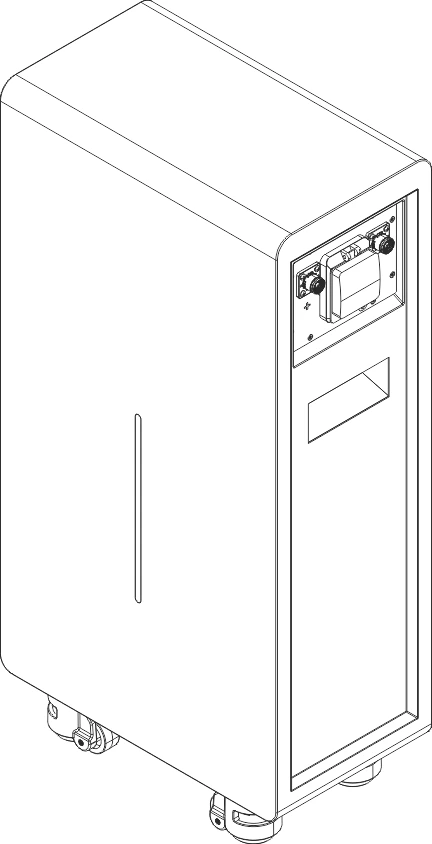
PowerCarol 16
PowerCarol 16
51.2V 314Ah LiFePO₄ low-voltage energy storage battery
IP65 · Indoor & outdoor installation
IP65 · Indoor & outdoor installation
51.2V / 314Ah
≈ 16 kWh
Parallel ≤ 63
125 kg
IP65
GOBEL POWER
Installation Manual
Full Manual · EN
MODEL
GP-WP1-16K-PC200B
GP-WP1-16K-PC200B
INSTALLATION MANUAL
Gobel PowerCarol 16
51.2V 314Ah LiFePO₄ low-voltage energy storage battery · IP65 indoor & outdoor installation
51.2V / 314Ah
≈ 16 kWh
Parallel ≤ 63
125 kg
IP65
Product Introduction
This manual applies to the Gobel PowerCarol 16 series (model GP-WP1-16K-PC200B). The product is a 51.2V 314Ah lithium iron phosphate (LiFePO₄) low-voltage energy storage battery. It uses high-performance 314Ah LiFePO₄ cells and features a floor-standing structure with casters at the bottom and handles on the sides, IP65 ingress protection for both indoor and outdoor installation, and a high-performance Battery Management System (BMS) that provides comprehensive monitoring and protection of the battery.
01PRODUCT OVERVIEW
1.1 · Gobel PowerCarol 16
| Product name | Gobel PowerCarol 16 |
| Product model | GP-WP1-16K-PC200B |
| Brand | Gobel Power |
| Product type | 51.2V 314Ah LiFePO₄ low-voltage energy storage battery |
| Rated voltage | 51.2V |
| Rated capacity | 314Ah (approx. 16kWh) |
| Ingress protection | IP65 |
| Installation | Floor-standing (with casters and handles) |
| Dimensions | See "Product Dimensions Diagram" on p. 15 |
| Weight | 125 kg |
02CONTENTS
10 chapters + appendix
01Product Introduction01
02Safety Instructions03
03Transportation & Handling05
04Installation06
05Electrical Connection08
06Operation12
07Product Monitoring13
08Maintenance & Storage13
09Product Specifications14
10Appendix / Contact16
GOBEL POWER
Installation Manual
Features · Interfaces
01PRODUCT FEATURES
1.2 · 9 items
- High-capacity energy storage: rated capacity of 314Ah (approx. 16kWh), meeting the energy storage needs of homes and small commercial & industrial applications
- Safe and reliable: LiFePO₄ cells offer chemically stable, thermally excellent performance
- Intelligent BMS management: real-time monitoring of battery voltage, current, temperature, SOC (state of charge) and other parameters, with multiple protections against over-charge, over-discharge, over-temperature, short circuit and more
- Flexible expansion: supports paralleling of up to 63 batteries for easy capacity expansion; parallel addresses are assigned automatically by the system (auto dial), with no manual address setting required
- Indoor & outdoor: IP65 ingress protection rating, floor-standing installation, suitable for both indoor and outdoor installation
- Easy to move: with casters at the bottom and handles on the sides, one person can move the equipment over a short distance
- Online monitoring: built-in WiFi interface, compatible with the Gobel VRM online monitoring platform, and supports integration with Home Assistant, ioBroker and other platforms
- Mobile APP management: use the Gobel Console APP to configure and upgrade the battery with one tap
- Standard interfaces: provides RS485A/CAN (inverter), RS232 (computer/mobile phone), RS485B/RS485C (paralleling) and other communication interfaces, compatible with mainstream inverters
01APPLICATION SCENARIOS
1.3
- Residential PV energy storage systems
- Small commercial and industrial energy storage systems
- Backup power (UPS) systems
- Off-grid energy storage systems
- Outdoor energy storage systems (IP65 protected)
01APPEARANCE & INTERFACES
1.4 · Panel parts on p. 03
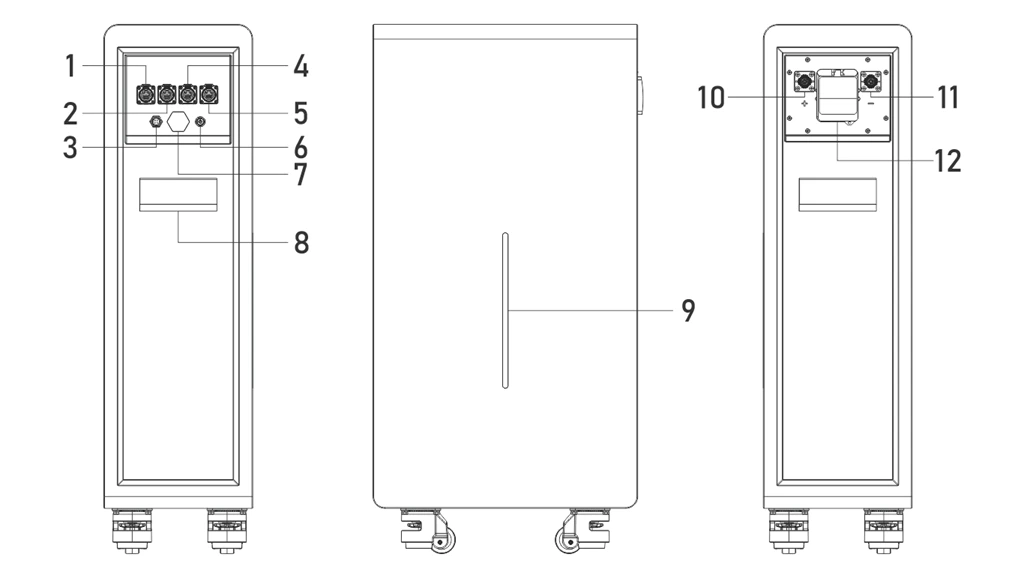
Interface panel — terminals, ports, indicators and controls on the battery panel; the numbers match the parts table on p. 03
GOBEL POWER
Installation Manual
Panel Parts · Safety
| No. | Component | Description |
|---|---|---|
| 1 | RS485A/CAN port | Inverter communication interface |
| 2 | RS232 port | Connects to a computer or mobile phone for host monitoring and parameter setting |
| 3 | WiFi interface | Wireless communication interface for the Gobel VRM online monitoring platform, Home Assistant, ioBroker, etc. |
| 4 | RS485B port | Communication interface for battery paralleling |
| 5 | RS485C port | Communication interface for battery paralleling |
| 6 | ON/OFF switch | Turns the battery BMS on or off |
| 7 | Exhaust valve | Automatically releases pressure when the internal pressure becomes abnormal; do not block it |
| 8 | Handle | Used to move and carry the battery |
| 9 | LED light bar | Indicates SOC (state of charge), Run (running) and Alarm (alarm) status |
| 10 | Positive terminal | Positive energy-storage quick-connect terminal |
| 11 | Negative terminal | Negative energy-storage quick-connect terminal |
| 12 | Circuit breaker | Controls making/breaking of the battery main circuit |
Note: pin definitions of each communication interface are given in Appendix III "Product Communication Pin Definitions" (p. 17).
02SAFETY INSTRUCTIONS
Read before installation, use and maintenance
Before installing, using and maintaining this product, carefully read and understand the following safety instructions. Failure to comply may result in personal injury, equipment damage or property loss. Do not cover, alter or remove the warning labels and specification nameplate on the product.
2.1 Personnel and Protection Requirements
NOTE — Personnel Requirements
Installation and maintenance operations must be performed by qualified personnel with electrical knowledge. Persons unfamiliar with electrical equipment must not install the product on their own.
WARNING — Personal Protection
- Use insulated tools and wear insulated gloves during operation; remove watches, rings and other metal accessories
- Do not place tools or metal parts on the battery, to prevent terminals from contacting exposed wires or metal objects
- Adjacent live parts should be covered or shielded
- Components may become extremely hot in the event of equipment failure; do not touch them to avoid burns
GOBEL POWER
Installation Manual
Safety Precautions
2.2 Safety Precautions
DANGER — Electric Shock Hazard
This product is an energy storage device; improper operation may cause severe electric shock accidents. Before performing any electrical connection or maintenance, be sure to open the battery circuit breaker and turn off the BMS via the ON/OFF switch.
CAUTION — Battery Safety
- Never short-circuit the positive and negative terminals of the battery; a short circuit produces extremely high current and may cause fire or explosion
- Verify that the battery polarity connections are correct before operation; reversed connection will damage the equipment
- Do not use open flames or spark-generating equipment near the battery
- If the battery enclosure is deformed, leaking or abnormally hot, stop using it immediately and contact technical support
CAUTION — Electrolyte Handling
The electrolyte is harmful to skin and eyes and may be toxic; do not touch it. If electrolyte accidentally contacts eyes or skin, rinse immediately and continuously with clean water for at least 10 minutes and seek medical attention promptly.
DANGER — No Unauthorized Disassembly
No one other than manufacturer-authorized personnel may open, service or disassemble the battery. There are no user-serviceable parts inside; unauthorized disassembly or modification will void the warranty and may cause safety accidents. It is recommended to place warning signs or fences near the product to prevent accidental operation.
CAUTION — Disposal and Recycling
- Batteries that are damaged, swollen or leaking must be taken out of service immediately and stored in a dry, cool, moisture-proof environment away from light; do not repair or disassemble them yourself — contact your installer, dealer or a professional recycling organization
- Waste batteries must not be discarded as household waste; dispose of them at designated recycling points in accordance with local regulations, and remove any privacy-related information from the product before disposal
WARNING — Fire-Fighting Requirements
In the event of a battery fire, only dry-powder fire extinguishers may be used; liquid fire extinguishers are strictly prohibited. Keep the battery away from high-temperature heat sources such as open flames and heaters.
CAUTION — Handling Safety
The product weighs 125 kg; carrying it by a single person by force is prohibited. Handling and moving must be performed with appropriate handling equipment and by multiple people working together. The product is heavy on top and light on the bottom; never lay it on its side or upside down, and take care to prevent the equipment from tipping over during movement, which could cause personal injury. See "Transportation & Handling" on p. 05.
GOBEL POWER
Installation Manual
Transportation & Handling
03TRANSPORTATION & HANDLING
125 kg · top-heavy
3.1 Transportation Requirements
- During transportation, protect the product from severe vibration, shock and crushing; avoid direct sunlight, rain and moisture, and take rain-proof, moisture-proof and sun-proof measures
- Smoking is strictly prohibited in transportation, loading and unloading areas; without permission, freight personnel must not open the battery packaging on their own
- Lithium-ion batteries are Class 9 dangerous goods (UN3480); cross-border sea, land and air transport must comply with the applicable dangerous goods transport regulations, and dangerous goods labels must be affixed as required
- If the battery emits an odor, leaks, smokes, catches fire or shows any other abnormality before transportation, transportation is strictly prohibited
- Transportation operations must be performed by trained professionals; handlers must wear protective gloves and safety shoes
- Do not remove the transportation packaging before the product arrives at the installation site
3.2 Handling Methods
3.2.1 Manual Handling
- The product weighs 125 kg; carrying it by a single person by force is prohibited. Before handling, confirm that all personnel are in good physical condition, wear anti-slip gloves, safety shoes and other protective gear, and watch out for sharp metal panels and heavy objects
- Clear the handling route and confirm the floor is safe before moving; slow down when passing ramps, narrow spaces and stairs, and assign dedicated personnel to assist
- The product is heavy on top and light on the bottom; laying it on its side, upside down or moving it without securing it is prohibited. Take measures to prevent tipping during movement
- For short-distance movement on level ground, push the battery using the side handles together with the bottom casters; lock the casters once the product is in position
- When carrying, stay close to the equipment, bend your knees and lift smoothly, using leg strength rather than your back; do not jerk or twist your body. When turning, move your feet instead of twisting your waist
- Move the equipment smoothly at a constant speed and lift and set it down gently, to prevent collision, dropping, scratching or damage to components and cables
- After handling, confirm that the equipment is placed stably to prevent it from tipping over and injuring people
3.2.2 Using Handling Equipment
- When using forklifts or other handling equipment, operation must be performed by certified professionals in compliance with the equipment's operating requirements; unrelated personnel must stay at least 2m away from the work area, standing or riding on the forklift or its load is prohibited, and overloading is prohibited
- The rated load of the handling equipment should be more than twice the product weight (this product weighs 125 kg, i.e. more than 250 kg), and the fork arm length should be no less than the product depth
- Control travel speed and avoid sharp turns; before reversing, confirm the area behind is clear, and assign dedicated personnel to direct operations in narrow spaces
- Working on slopes with a gradient ≥5° is prohibited; slow down on uneven ground
- Tilting or inverting the product during handling is prohibited; if tilting is unavoidable, return it upright as soon as possible and let it stand for 2 hours before powering on
GOBEL POWER
Installation Manual
Pre-Installation
04INSTALLATION
Floor-standing installation
4.1 Pre-Installation Preparation · 4.1.1 Installation Environment Requirements
- Floor: the installation floor should be level and solid with sufficient load-bearing capacity (the product weighs 125 kg)
- Ventilation: the installation site should be well ventilated to avoid heat accumulation; do not block the equipment's vents or heat-dissipation structures, and keep away from equipment air outlets
- Environmental conditions: dry and clean, free of corrosive gases or dust; ambient temperature -25°C ~ 55°C, relative humidity not exceeding 95% RH (non-condensing); the recommended installation altitude is no more than 3000m
- Safety clearances: keep away from flammable and explosive materials, heat sources, open flames and high-temperature objects. Do not install or operate the equipment in environments containing flammable or explosive gases or fumes, and do not store such materials around the equipment
- Waterproofing: this product has an IP65 ingress protection rating and can be installed both indoors and outdoors; do not install it in locations that may be flooded, and keep it away from areas prone to standing water, condensation or water seepage
- Avoid direct sunlight: keep the site out of direct sun; outdoors use a shaded spot or sunshade — summer exposure may trigger over-temperature protection and reduce charge/discharge performance
- Corrosive environments: avoid magnetic dust, volatile or corrosive gases, organic solvents, conductive metal dust and salt-spray environments
- Electromagnetic and vibration: avoid locations with strong vibration, noise and electromagnetic interference
- Others: do not install the equipment on moving carriers such as ships, trains or automobiles; the installation location should be away from children and daily living and working areas
To ensure heat dissipation and space for maintenance operations, maintain sufficient clearance between the battery and walls or other equipment:
- Distance from both sides of the battery to walls ≥ 100mm
- Distance from the top of the battery to obstacles above ≥ 300mm
- Reserve at least 800mm of operating space in front of the battery (interface panel side)
CAUTION
Before installation and power-on, clear dust and iron filings from the installation area; confirm that the site has sufficient load-bearing capacity and take anti-static measures; do not install the equipment in enclosed, poorly ventilated locations without fire-fighting facilities, or in locations inaccessible to fire fighters.
4.1.2 Tool Requirements
Prepare the following tools and instruments before installation:
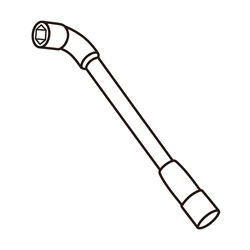
Socket wrench
Tighten power terminals on the inverter side

Adjustable wrench
Tighten terminal nuts on the inverter side
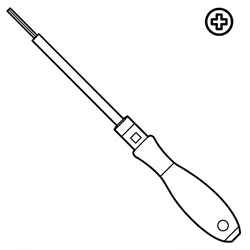
Phillips screwdriver
Tighten wiring screws on the inverter side
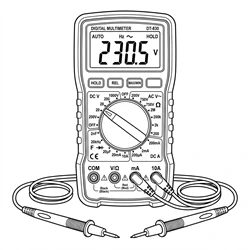
Multimeter
Measure terminal voltage
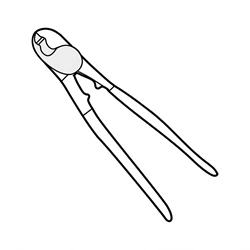
Crimping tool
Crimp the energy-storage quick-connect terminals
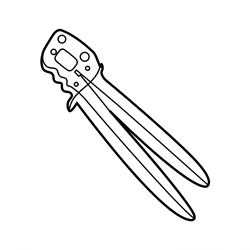
RJ45 crimping tool
Re-crimp RJ45 plugs for outdoor installation
Tape measure
Measure cable lengths and installation distances

Marker pen
Mark measured positions
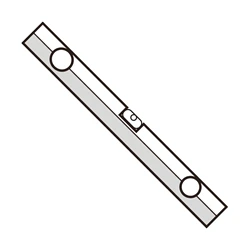
Spirit level
Confirm the equipment is installed level

Insulated gloves
Operation protection
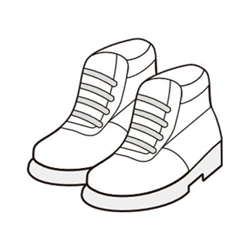
Insulated shoes
Operation protection
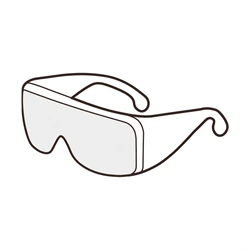
Safety goggles
Work protection (recommended)
+
Windows PC
For host software protocol setting
+
Smartphone
For Gobel Console APP configuration
Note: for the complete procedure of making your own power cables (crimping the energy-storage quick-connect terminals), see Section 5.2.2 "Making the Power Cables".
GOBEL POWER
Installation Manual
Unpacking & Inspection
4.2 Unpacking and Inspection · 4.2.1 Parts List
After unpacking, check the product and accessories against the table below to confirm that all parts are complete and in good condition.
| No. | Item | Specification / Qty | Photo |
|---|---|---|---|
| 01 | Gobel PowerCarol 16 energy storage battery | 51.2V 314Ah, 1 unit | |
| 02 | Positive/Negative energy-storage quick-connect terminals (cable side power connector) | 1 positive + 1 negative (cables to be crimped by yourself) | 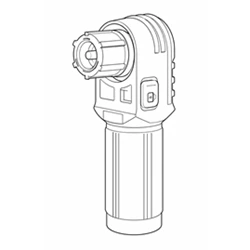 |
| 03 | Communication network cable | RJ45 on both ends, symmetric wiring, 1 pc (parallel cable or inverter communication cable) | 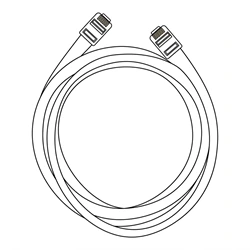 |
| 04 | RS232-USB communication cable | 1 pc (connects to the computer host software) | 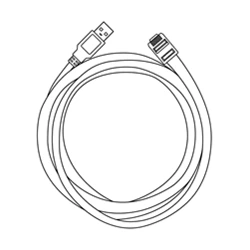 |
| 05 | USB Type-C data cable | 1 pc (connects to a mobile phone) | 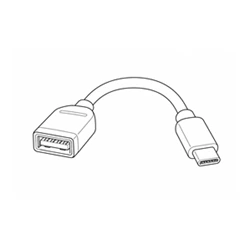 |
| 06 | RJ45 waterproof cable gland | 2 pcs (for waterproofing in outdoor installation) | 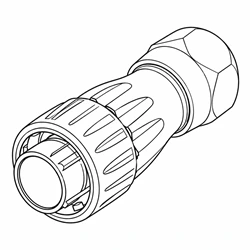 |
| 07 | RJ45 plugs | 4 pcs (for re-crimping in outdoor installation) | 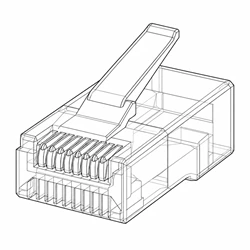 |
4.2.2 Unpacking Inspection Procedure
- Remove the energy storage battery (01) from its packaging and check whether the outer packaging and product appearance are intact.
- Check the product and accessories against the parts list in 4.2.1 for missing or damaged items.
- Power on via the panel ON/OFF switch, and check whether the LED light bar shows a normal display.
- Set the circuit breaker to the ON position, and use a multimeter to measure the voltage across the battery positive terminal and negative terminal; the normal voltage should be between 40V ~ 58V.
- If all checks are normal, proceed to the next installation step.
CAUTION
If the product appearance is damaged, accessories are missing or the voltage is abnormal, do not continue installation; contact Gobel Power technical support promptly.
NOTE — Unpacking Tips
- Do not remove the transportation packaging in advance before the product arrives at the installation site; handle with care when unpacking to avoid scratching the equipment
- Before unpacking, check whether the outer packaging is damaged and whether the shock indicator has been triggered; if triggered, transportation damage cannot be ruled out
- Clean all parts before installation; prevent collision and scratching during handling and storage, and take moisture-proof and rust-proof measures
- The system should be installed and commissioned within 6 months of delivery; long-term idle storage accelerates battery capacity degradation
GOBEL POWER
Installation Manual
Installation Steps · Electrical Safety
4.3 Installation Procedures
This product features a floor-standing structure with casters at the bottom and handles on the sides, making it easy to move. Installation steps:
- Open the circuit breaker of the energy storage battery (01) and power it off via the ON/OFF switch.
- Use the side handles together with the bottom casters to move the battery to the predetermined installation position (two people working together is recommended to prevent tipping); lock the casters once the battery is in position.
- Use a spirit level to confirm the equipment is level; if the floor is uneven, adjust the position or shim the equipment so that it stands stable without wobbling.
CAUTION
Pay attention to floor evenness when moving the battery and avoid excessive tilt angles. The battery weighs 125 kg; be sure to move it safely to prevent it from tipping over and injuring people. Face the interface panel side toward a direction convenient for wiring and maintenance.
CAUTION — Installation Discipline
- Installation must strictly follow this manual and the design requirements; unauthorized changes to installation steps or technical parameters are prohibited
- During installation and wiring, keep all switches in the OFF position; working on live equipment is strictly prohibited
- All fasteners must be tightened securely
4.4 Post-Installation Inspection
After installation is complete, confirm the following items are normal:
- The battery exterior is intact, with no deformation, dents or scratches
- The equipment is placed securely and the casters are locked
- Surrounding passages are clear and free of flammable and explosive materials
- Warning labels and the specification nameplate are complete and legible
- On-site fire-fighting equipment is in place and compliant
05ELECTRICAL CONNECTION
Confirm the inverter is off and disconnected before wiring
5.1 Safety Precautions
WARNING — Wiring Requirements
This product supports parallel connection only; series connection is strictly prohibited. A maximum of 63 units can be connected in parallel. Series connection may cause equipment damage or safety hazards.
WARNING — Electrical Safety Precautions
- Terminals may still carry residual voltage after the battery is powered off. Before wiring, wait at least 10 minutes and use a multimeter to confirm that no voltage is present
- Never connect the battery directly to the AC grid or to PV (photovoltaic) DC lines; the battery may only be connected to matching power conversion equipment such as an inverter
- Do not use faulty power conversion equipment (such as an inverter) or one that is not matched to the battery; before connection, confirm that the battery system parameters are fully compatible with the connected equipment
- Do not perform electrical connections during sandstorms or when the ambient relative humidity exceeds 95%
- Wiring must be performed by qualified personnel with electrical knowledge, wearing protective equipment as required in Chapter 2
GOBEL POWER
Installation Manual
Preparation · Power Cables
5.2 Connection Preparation · 5.2.1 Cable Preparation
Before connection, confirm that the following cables and parts are ready:
- Positive/Negative energy-storage quick-connect terminals (02): one positive + one negative, cables to be crimped by yourself
- Communication network cable (03): RJ45 on both ends, symmetrically wired; can be used as a parallel communication cable or an inverter communication cable
- RS232-USB communication cable (04): used to connect a Windows PC for host software monitoring and protocol configuration
- USB Type-C data cable (05): used to connect a mobile phone for configuration via the Gobel Console APP
- RJ45 waterproof cable gland (06) and RJ45 plugs (07): used to make waterproof communication cables for outdoor installation
Also confirm that the inverter and other equipment have been installed in place, and shut down and de-energize the inverter. Refer to the battery connection sections of the inverter manual as well.
5.2.2 Making the Power Cables
The power cables must be made by yourself. Prepare 50mm² power cables of a suitable length, and crimp the cables onto the positive/negative energy-storage quick-connect terminals (02) as follows:
- Unscrew the tail cover (cable-sheath clamping nut) of the quick-connect terminal, and pass one end of the 50mm² cable through the tail cover.
- Strip the cable-end insulation to the crimp length required by the copper barrel (avoid damaging the copper strands), and insert all exposed strands to the bottom of the barrel.
- Using a crimping tool and die matched to the 50mm² cable, crimp at the specified position of the copper barrel. After crimping, visually check the crimp and gently pull the cable to confirm it is firm and conductive.
- Screw the tail cover back onto the terminal and tighten it so that the tail cover clamps the cable sheath reliably, preventing pulling forces on the cable from being transmitted to the crimp.
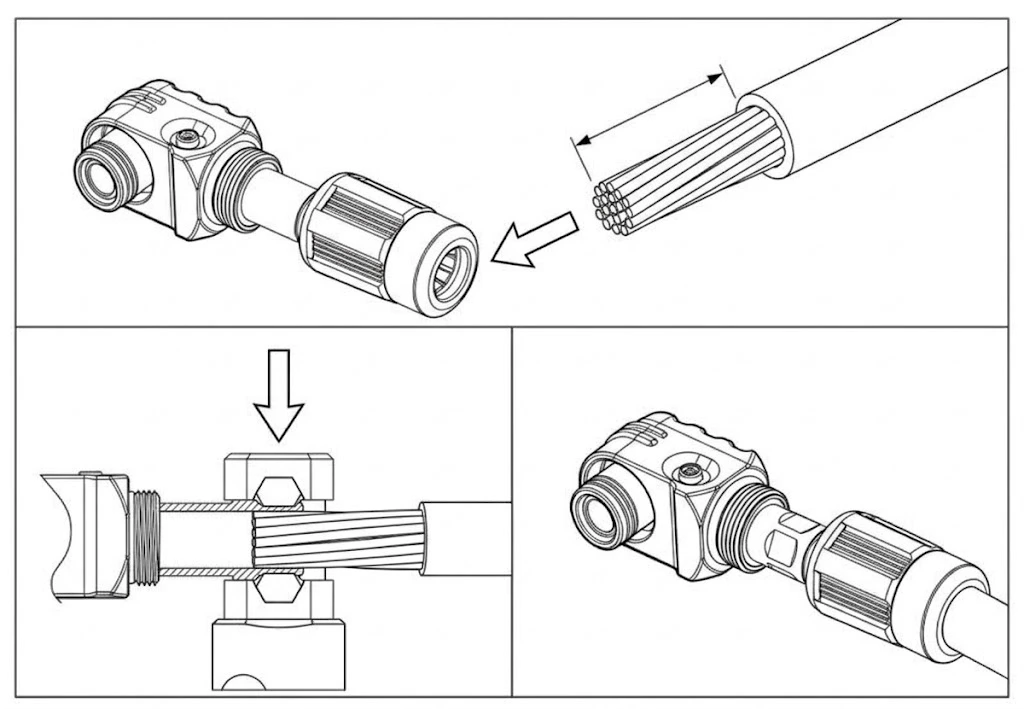
Connection diagram of the energy-storage quick-connect terminal
- Crimp the corresponding terminal onto the other end of the cable according to the connection target: directly to an inverter — crimp per the inverter's input terminal specification (e.g. M8 OT terminals); via busbars for paralleling — crimp per the busbar connection method (e.g. M8/M10 OT terminals), and tighten to the torque required by the inverter or busbar manual.
DANGER
Poor crimping increases the terminal contact resistance and can cause abnormal heating or even burning. Crimping must be performed by qualified personnel using proper tools; after crimping, check each crimp to confirm it is secure before putting it into service.
GOBEL POWER
Installation Manual
Waterproof Cables · Wiring
5.2.3 Making Waterproof Communication Cables
For outdoor installation, waterproof the battery ends of the communication cables (both ends for parallel cables) with the supplied RJ45 glands (06) and plugs (07):
- Inverter communication cable (battery → inverter): use 1 gland, fitted on the end connecting to the battery; handle the other end as required by the inverter.
- Parallel communication cable (battery → battery): use 2 glands, one fitted at each end.
The gland assembly steps are as follows:
- Unscrew the caps at both ends of the RJ45 waterproof gland (the front waterproof cap and the rear locking cap), and slide the removed rear cap onto the network cable;
- Cut off the RJ45 plug from the network cable, pass the cable through the rear cap and insert it into the gland body;
- Crimp a new RJ45 plug (07) onto the cable;
- Screw the front waterproof cap back onto the front end of the gland and tighten it;
- Insert the gland front end into the waterproof port on the panel, and tighten the rear cap so that the gland is locked and clamps the cable sheath, achieving a waterproof seal.
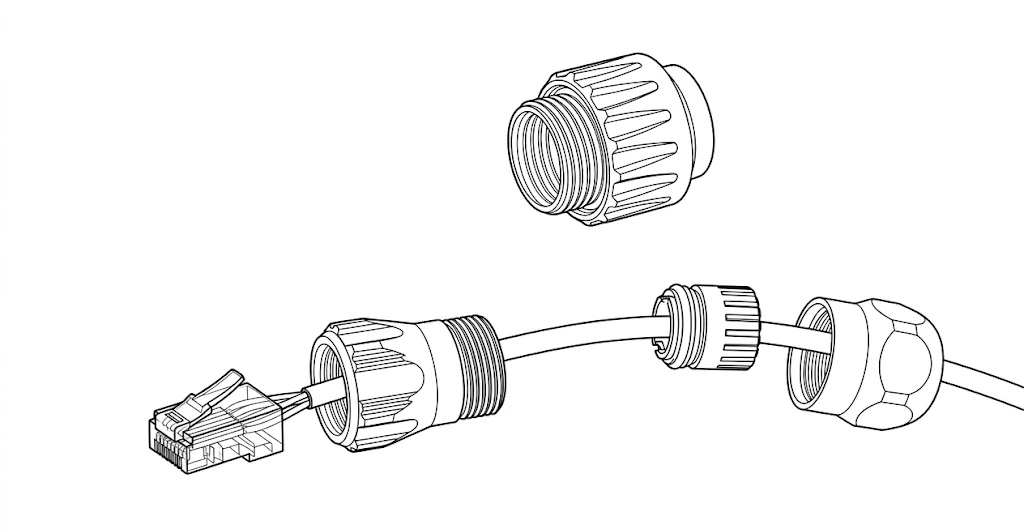
RJ45 waterproof cable gland connection steps
Note: for parallel communication cables, the other end needs no cutting: slide the rear cap and body of the second gland onto the cable from the cut end, push it to the intact end so the original RJ45 plug passes out through the gland front, then tighten that gland's rear cap.
5.2.4 Battery Address Note
This product requires no manual address setting; parallel addresses are assigned automatically by the system (auto dial). When multiple batteries are paralleled, the system automatically designates the host and slaves; the inverter communication protocol only needs to be set on the host — see Section 6.2 "Inverter Communication Protocol Settings".
5.3 Cable Connection · 5.3.1 Grounding Connection
- Complete the battery system grounding per local electrical codes and the inverter's requirements
- Ensure that an overvoltage protection device is installed at the site where the system is located
5.3.2 Power Cable Connection
Insert the positive quick-connect terminal of the self-made power cable into the battery positive terminal and lock it fully in place, with the other end going to the inverter's positive battery input. Insert the negative quick-connect terminal into the battery negative terminal and lock it fully in place, with the other end going to the inverter's negative battery input.
CAUTION
Make sure the positive and negative terminals are correctly matched; reverse connection will cause severe equipment damage. Insert the terminals fully in place; after connection, gently pull the cables to confirm there is no looseness.
Note · Cable routing: do not pull or strain the cables. Leave sufficient bending space for the cables and use appropriate fasteners to reduce cable stress.
GOBEL POWER
Installation Manual
Communication · Parallel · Inspection
5.3.3 Communication Cable Connection
Connect one end of the communication network cable (03) to the RS485A/CAN port of the host battery, and the other end to the inverter's BMS communication interface (whether RS485 or CAN protocol is used depends on the inverter manual and must match the battery's protocol settings). Depending on the installation environment, wire the communication cables as follows:
- Indoor installation: the RJ45 waterproof gland may be omitted; insert the RJ45 plug directly into the RS485A/CAN, RS485B, RS485C or RS232 communication port.
- Outdoor installation: use the RJ45 waterproof cable glands (06) supplied as accessories to make waterproof communication cables; see Section 5.2.3 "Making Waterproof Communication Cables". The RS232 port is used to connect the host computer and is not permanently connected, so the RJ45 waterproof gland may be omitted for it.
CAUTION
Verify that the pin definitions of the inverter's BMS communication interface match those of the battery's RS485A/CAN port. The communication network cable supplied with this product is symmetrically wired on both ends. If the pin definitions of the inverter and the battery differ, you need to make a communication cable with the corresponding wiring sequence using an RJ45 crimping tool, or purchase an adapter cable from the inverter manufacturer (e.g., for Victron inverters).
Note: for the pin definitions of each communication interface, see Appendix III "Product Communication Pin Definitions" (p. 17).
5.4 Multi-Pack Parallel Connection
CAUTION
Never connect batteries of different models or specifications in parallel. This product supports a maximum of 63 units in parallel. When connecting multiple batteries, route the cables along the designated paths; do not change the wiring layout arbitrarily.
5.4.1 Parallel Power Connection
If multiple batteries are used in parallel, the positive and negative terminals of each battery must be connected to busbars via power cables, and the busbars then connected to the inverter. For connection diagrams, see "Battery-Inverter Connection Diagrams" in Appendix IV (p. 18).
5.4.2 Parallel Communication Connection
When multiple batteries are connected in parallel, use parallel communication cables to daisy-chain the RS485B and RS485C ports of the batteries: connect the RS485B of the first battery to the RS485C of the second battery, the RS485B of the second battery to the RS485C of the third battery, and so on. For outdoor installation, it is likewise recommended to make the parallel communication cables with RJ45 waterproof cable glands (see Section 5.2.3).
Note: no manual address setting is required for the parallel communication connection; the system assigns addresses automatically (auto dial).
5.5 Post-Connection Inspection
After all cables are connected, check each item in turn:
- After completing each connection, verify that it is correct and secure, with no looseness or poor contact; the quick-connect terminals are locked fully in place and all fasteners are fully tightened
- Positive and negative power cables have correct polarity, and the connections are secure and reliable
- Prevent terminals from contacting exposed wires or metal objects; adjacent live parts should be covered
- Remove foreign objects around the equipment, especially metal debris, to prevent short circuits
GOBEL POWER
Installation Manual
Operation · Protocol · Power On
06OPERATION
Pre-start checks · Protocol · Power on
6.1 Pre-Power-On Checks
CAUTION — Before Power On
- All items of Section 5.5 "Post-Connection Inspection" have been confirmed correct
- The work area is cleared; unauthorized personnel and animals are kept away from the equipment
6.2 Inverter Communication Protocol Settings
When multiple batteries are connected in parallel, only the host battery's communication protocol needs to be set; slaves require no configuration. Use any one of the following three methods:
- Set via PC host software: use the RS232-USB communication cable (04) to connect a Windows PC to the host battery, and select the communication protocol that matches the inverter in the host software on the PC.
For detailed host software operation, refer to the "PCBMS Software User Manual" in the Reference Documents (p. 18).
- Set via mobile APP: use the USB Type-C data cable (05) to connect a mobile phone to the host battery, and select the communication protocol that matches the inverter in the Gobel Console APP.
- Set on the Gobel VRM platform or APP: after the battery is connected to the network, the communication protocol that matches the inverter can be selected on the Gobel VRM platform or APP.
Note · WiFi configuration: for the battery's WiFi configuration and access to the online monitoring platform, refer to the "WiFi User Manual".
Note · Inverter compatibility: before setting the communication protocol, confirm that the brand and model of the inverter are compatible with the battery. For the list of verified compatible inverters, refer to the "Inverter Compatibility List" in the Reference Documents (p. 18).
6.3 Power-On
Power on in the following sequence: BMS power-on (ON/OFF switch) → Wait → Circuit breaker ON → Inverter power-on.
- Check the power and communication connections to ensure all cables are firmly connected with no looseness.
- Press the ON/OFF switch on all batteries to power on (BMS ON), and wait for the battery system to complete self-check, with the LED light bar showing normal status and no alarms.
- Switch the circuit breaker of all batteries to the ON position.
- Turn on the inverter's power switch.
- Set the battery type to lithium battery in the inverter.
- Check the battery information displayed in the inverter to confirm that data has been correctly retrieved from the battery BMS (e.g., battery voltage, battery SOC, temperature).
- If the inverter reads the data correctly, the installation is complete and charge/discharge testing can be performed.
WARNING — Power-On Sequence
Do not turn on the inverter before or simultaneously with the circuit breaker, and do not close the circuit breaker without the waiting step; otherwise, a large inrush current may occur, causing equipment damage or triggering protection.
Tip: if the inverter cannot read battery data after power-on, check whether the communication cables are properly connected and whether the communication protocol is set correctly. For more common fault handling, see Appendix I (p. 16).
GOBEL POWER
Installation Manual
Power Off · Monitoring · Maintenance
6.4 Power-Off
Power off in the following sequence: Inverter OFF → Wait → Circuit breaker OFF → BMS power-off (ON/OFF switch).
- Shut down the inverter and its loads, and wait for the inverter to stop working completely.
- Switch the circuit breaker of all batteries to the OFF position.
- Press the ON/OFF switch to turn off the BMS of each battery.
CAUTION
Terminals may still carry residual voltage after power-off; do not touch the terminals immediately. Before performing maintenance, follow Section 8.1 "Maintenance Safety Precautions".
07PRODUCT MONITORING
Panel indicators · Host software · Remote
7.1 Panel Status Indicators
The battery's operating status can be viewed via the LED light bar on the panel: the LED light bar indicates SOC (state of charge), Run (running) and Alarm (alarm) status.
When the alarm (Alarm) indicator lights up, promptly investigate the cause of the fault. If it cannot be resolved, contact Gobel Power technical support. For common fault handling, see Appendix I (p. 16).
7.2 Host Software and Remote Monitoring
This product supports multiple monitoring methods:
- PC host software monitoring: use the RS232-USB communication cable (04) to connect a Windows PC to the battery, and run the battery host software on the PC to view operating status such as battery voltage, current, temperature, and SOC.
- Mobile APP monitoring: use the USB Type-C data cable (05) to connect a mobile phone to the battery, view the battery status via the Gobel Console APP, and perform one-touch configuration and upgrades.
- WiFi online monitoring: after the battery's built-in WiFi interface connects to the network, it is compatible with the Gobel VRM online monitoring platform and supports integration with platforms such as Home Assistant and ioBroker for remote monitoring. For WiFi configuration, refer to the "WiFi User Manual".
Note: for detailed host software operation, refer to the "PCBMS Software User Manual" in the Reference Documents (p. 18).
08MAINTENANCE & STORAGE
Fully power off before maintenance
8.1 Maintenance Safety Precautions
- Before maintenance, the battery must be completely de-energized (disconnect both the grid and the battery side), following the principle of "de-energize → prevent unintended re-closing → verify no voltage → grounding and short-circuit protection → cover adjacent live parts"
- Hang a "Do Not Close" warning tag on the switch position to prevent unintended power restoration
- Before maintenance, disconnect all battery terminals and circuit connectors, and install protective caps on the terminals; use insulated tools and never wear jewelry, watches, or other metal accessories
8.2 Routine Maintenance Requirements
- When replacing parts, always use spare parts of the same type and specification
- Do not spray paint on any internal or external parts of the battery, and do not clean the battery with cleaning solvents
- If any abnormality is found, contact the supplier within 24 hours
- During daily use, keep the battery SOC above 5%, and recharge within 48 hours after a full discharge to avoid over-discharge
GOBEL POWER
Installation Manual
Storage · Specifications
8.3 Post-Maintenance Requirements
- After maintenance, clear all tools and materials and confirm that no metal foreign objects are left inside or on top of the battery
- Confirm that terminal protective caps, guards, etc., are all restored in place before re-energizing
8.4 Long-Term Storage
If the battery will not be used for an extended period, store and maintain it as follows:
- Fully charge the battery, then switch off the circuit breaker and the ON/OFF switch (BMS off)
- Check the battery voltage at least every 3 months. If the voltage is below 51V, recharge promptly
- Store the battery in a dry, clean, well-ventilated location, away from direct sunlight and rain, and away from high-temperature heat sources, open flames, and flammable or explosive materials
- During storage, the battery should be completely disconnected from external equipment, and the LED light bar should be off
- The floor of the storage area should be level and solid, and qualified fire protection facilities (e.g., dry powder extinguishers, fire sand) should be provided
- Handle with care during transport and storage; dropping, collision, tipping, side placement, and tilting are prohibited
DANGER
Battery damage caused by failure to recharge in time is not covered by the warranty. Long-term storage without recharging will over-discharge the battery, causing irreversible capacity loss or even scrapping the battery.
09PRODUCT SPECIFICATIONS
9.1 Technical parameters
| Item | Parameter |
|---|---|
| Product name | Gobel PowerCarol 16 |
| Product model | GP-WP1-16K-PC200B |
| Brand | Gobel Power |
| Product type | 51.2V 314Ah LiFePO₄ low-voltage energy storage battery |
| Main Parameters | |
| Cell type | LiFePO₄ (lithium iron phosphate) |
| Rated capacity | 314Ah [1] |
| Parallel expansion | Up to 63 units in parallel [2]; series connection strictly prohibited |
| Nominal voltage | 51.2V |
| Operating voltage | 44.8V ~ 57.6V |
| Nominal energy | 16kWh |
| Usable energy | 16kWh [1] |
| Maximum output power | 7.68kW |
| Charge current [3] | Max. continuous 150A; peak 200A (25 s) |
| Discharge current [3] | Max. continuous 150A; peak 200A (25 s) |
| Active balancing | Yes |
GOBEL POWER
Installation Manual
Specifications · Dimensions
09PRODUCT SPECIFICATIONS (cont.)
9.1 Technical parameters · Others
| Item | Parameter |
|---|---|
| Other Parameters | |
| Maximum discharge depth | 100% DOD |
| Dimensions (W×H×D) | 480 × 959 × 270 mm |
| Weight | Approx. 125 kg |
| Display | LED light bar (SOC, alarm) |
| Ingress protection rating | IP65 |
| Operating temperature | Charge: 0°C ~ 55°C; Discharge: -25°C ~ 55°C |
| Storage temperature | 0°C ~ 35°C |
| Relative humidity | 95% (non-condensing) |
| Altitude | ≤3000m |
| Cycle life | ≥8000 cycles (25°C±2°C, 70% EOL) |
| Electrical isolation protection | Built-in circuit breaker |
| Installation | Floor-standing (with casters and handles) |
| Communication interfaces | CAN, RS485, RS232, WiFi |
| Energy throughput | 50MWh [4] |
[1] Test conditions: 25°C±2°C, beginning of life (BOL), 0.5C charge / 0.5C discharge, 100% DOD.
[2] Battery modules form the network automatically after power-on; no DIP switches required.
[3] Current is affected by temperature and SOC.
[4] Energy throughput is the total energy charged and discharged cumulatively over the battery's entire service life.
9.2 Product Dimensions Diagram
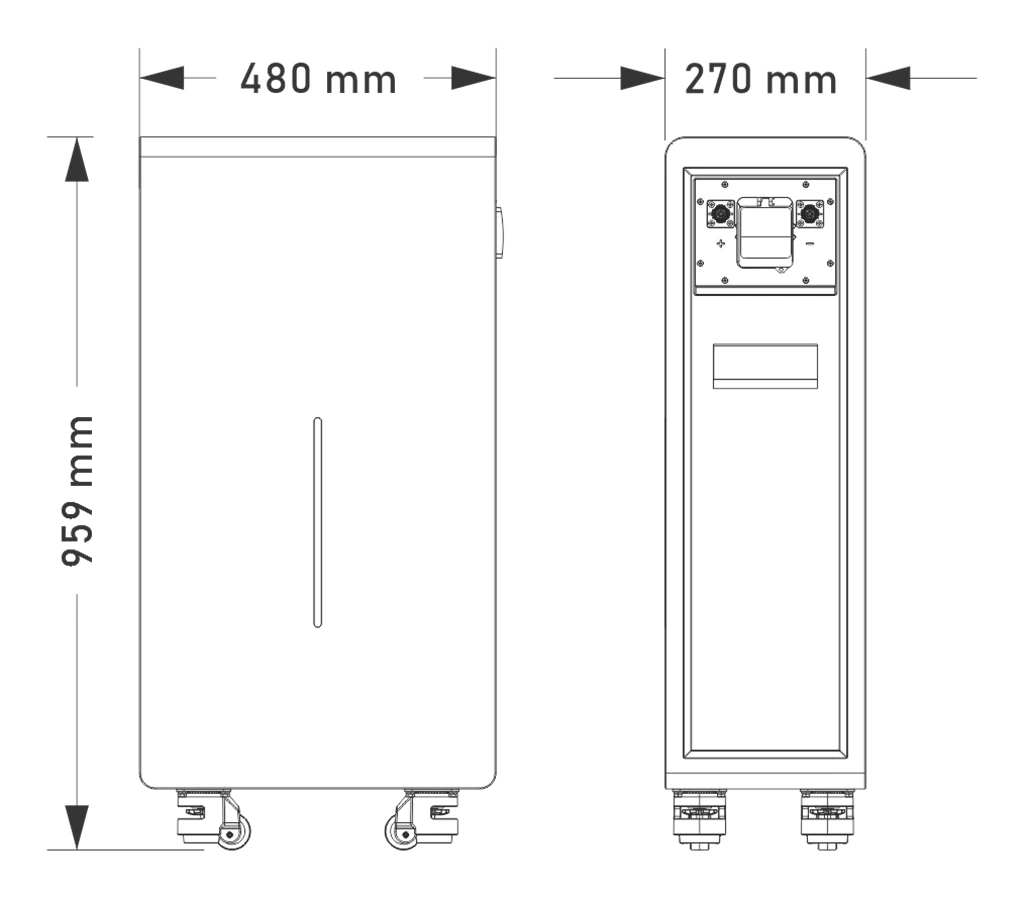
Gobel PowerCarol 16 product dimensions (unit: mm)
GOBEL POWER
Installation Manual
Troubleshooting · Emergency
10APPENDIX
Appendices I–IV · Reference · Contact
Appendix I Common Faults and Troubleshooting
| Symptom | Possible Cause | Remedy |
|---|---|---|
| Inverter cannot read battery data | Loose or open communication cable connection; mismatched pin definitions on both ends; incorrect communication protocol settings | Check the communication cable connections; verify the pin definitions on both ends (Appendix III); reconfigure the communication protocol (Section 6.2) |
| Abnormal terminal voltage measured at unboxing (below 40V or above 58V) | State of charge too low or product abnormality | Do not proceed with installation or use; contact Gobel Power technical support |
| Alarm (Alarm) indicator lights up | Battery fault or alarm | Stop use and investigate the cause of the fault; contact Gobel Power technical support if necessary |
| Battery enclosure deformed, leaking, or abnormally hot | Internal battery abnormality | Stop use immediately and contact technical support; see Appendix II for handling procedures |
| WiFi or mobile APP cannot connect to the battery | WiFi not configured or misconfigured | Reconfigure as described in the "WiFi User Manual" |
| Voltage below 51V after long-term storage | Self-discharge during storage | Recharge promptly before returning to service (Section 8.4) |
| Abnormal heating at the quick-connect terminal connections | Terminal not fully inserted or poor crimping | Power off, re-insert the terminal fully, and re-crimp per Section 5.2.2 if necessary |
Appendix II Emergency Handling
DANGER
In emergencies such as electric shock, fire, or electrolyte leakage, ensure personal safety first, evacuate personnel promptly, and call the appropriate emergency numbers. Do not operate damaged equipment without professional inspection and qualified testing.
Electric Shock
- Cut off the power immediately, provided your own safety is ensured
- Use an insulated object to separate the victim from the power source, administer first aid including cardiopulmonary resuscitation (CPR), and immediately call the emergency number
- Preserve the accident scene for investigation and evidence collection
- After the accident, the system must be inspected by professionals and may only be returned to service after repair or replacement and passing testing
Fire or Explosion Risk
- Evacuate the area immediately and call the fire department; stay away from smoke produced by burning. Only dry powder extinguishers may be used to fight the fire; liquid extinguishers are strictly prohibited
- Cut off the upstream power supply, provided your own safety is ensured, and wear respiratory protective equipment
- Isolate the accident area where it is safe to do so, preventing unauthorized personnel from entering; post-incident handling must be completed by professionals
GOBEL POWER
Installation Manual
Emergency · Pin Definitions
Appendix II Emergency Handling (cont.)
Electrolyte Leakage and Chemical Hazards
- In the event of electrolyte leakage, evacuate personnel immediately and notify the relevant personnel; the leaked material must be safely collected and disposed of by professionals
- Burning or damaged batteries may release toxic gases; evacuate to a safe area immediately. If personnel are exposed or injured, seek medical attention immediately
- When handling leaked material, wear respiratory protective equipment, protective clothing, and other safety gear
Mechanical Injury
- If the equipment tips over, the battery falls, or parts come loose, cut off the power immediately and stop the system
- If anyone is injured, administer first aid such as stopping bleeding and bandaging, and immediately call the emergency number
- If abnormalities such as odor, damage, smoking, or fire are observed, evacuate immediately and raise the alarm; the abnormal battery should be moved by professionals to an open, safe area, left undisturbed for at least 1 hour, and its temperature monitored
Natural Disasters
- In the event of natural disasters such as earthquakes, typhoons, floods, or wildfires, cut off the power immediately and stop the system
- If the system is flooded or submerged, do not touch it and stay away from the waterlogged area. Flooded batteries must not be used again; contact a professional recycling agency for scrapping
- Before a wildfire approaches, a firebreak may be established around the system, and fire equipment such as extinguishers and fire sand should be prepared
- After the disaster, professionals must inspect the support structure, electrical connections, and other components; the system may only be reused after repair or replacement and passing testing
Appendix III Product Communication Pin Definitions
RS485A/CAN Port
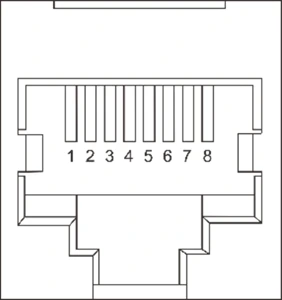
| Pin | Definition |
|---|---|
| 1 | B |
| 2 | A |
| 3 | GND |
| 4 | CAN-H |
| 5 | CAN-L |
| 6 | GND |
| 7 | A |
| 8 | B |
RS232 Port
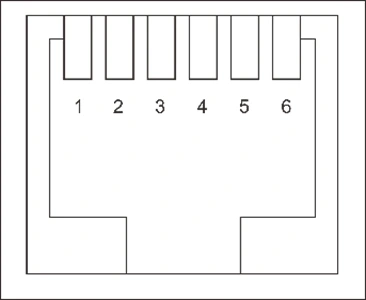
| Pin | Definition |
|---|---|
| 1 | NC |
| 2 | NC |
| 3 | TXD |
| 4 | RXD |
| 5 | GND |
| 6 | NC |
RS485B / RS485C Ports
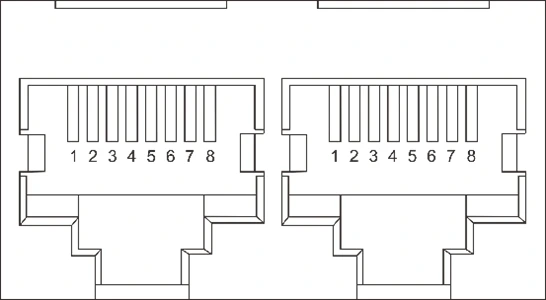
| Pin | Definition |
|---|---|
| 1 | B |
| 2 | A |
| 3 | GND |
| 4 | NC |
| 5 | NC |
| 6 | GND |
| 7 | A |
| 8 | B |
GOBEL POWER
Installation Manual
Diagrams · Reference · Contact
Appendix IV Battery-Inverter Connection Diagrams
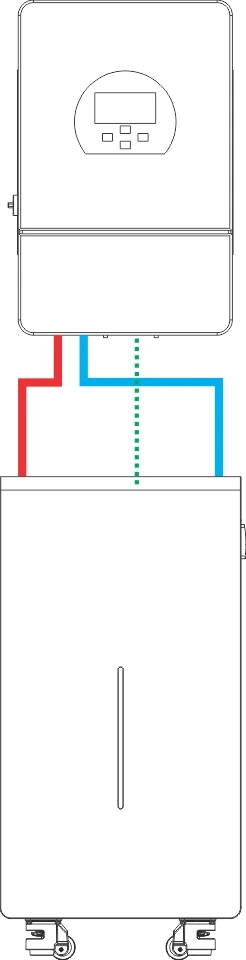
Single Battery-to-Inverter Connection
Note: solid lines represent the power cables; dotted lines represent the communication cable.
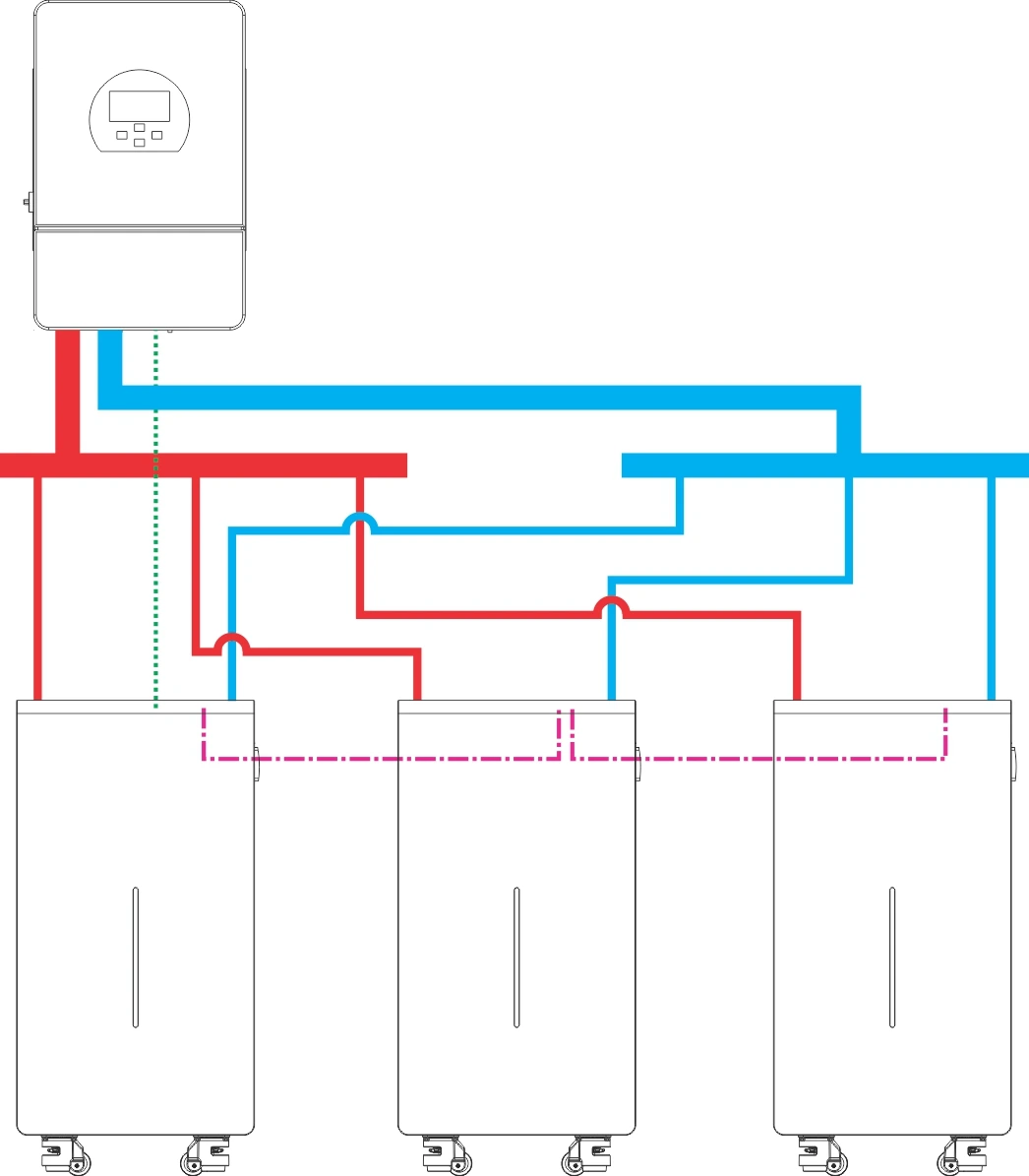
Multiple Batteries-to-Inverter Connection
Note: solid lines represent the power cables and busbar; dotted lines represent the inverter communication cables; dash-dotted lines (-.-.-) represent the parallel communication cables between batteries.
Reference Documents
In addition to this manual, refer to the following companion documents as needed:
| Document Name | Description |
|---|---|
| WiFi User Manual | Battery WiFi configuration and integration with online monitoring platforms such as Gobel VRM, Home Assistant, and ioBroker |
| PCBMS Software User Manual | Installation and detailed operating instructions for the PC host software |
| Gobel Console APP User Manual | Connection, one-touch configuration, and upgrade operations of the mobile APP |
| Inverter Compatibility List | List of verified compatible inverter brands and models |
CONTACT
If you encounter a fault that cannot be resolved or need technical support, contact Gobel Power:
www.gobelpower.com
[email protected]