GOBEL POWER
Quick Installation Guide
EN
MODEL
GP-WP1-16K-PC200B
GP-WP1-16K-PC200B
QUICK INSTALLATION GUIDE · PCBMS VERSION
Gobel PowerCarol 16
51.2V 314Ah LiFePO₄ low-voltage energy storage battery · IP65, indoor & outdoor
51.2V / 314Ah
≈ 16 kWh
Parallel ≤ 63
125 kg · IP65
Scope
This guide applies to the Gobel Power PowerCarol 16 series PCBMS version (model GP-WP1-16K-PC200B) and is intended for experienced installers, listing only the key steps and points. For complete installation instructions, safety precautions and troubleshooting, refer to the Gobel PowerCarol 16 Installation Manual (PCBMS Version).
01KEY SPECIFICATIONS
GP-WP1-16K-PC200B
| Product name | Gobel PowerCarol 16 (PCBMS Version) |
| Model | GP-WP1-16K-PC200B |
| Rated voltage / capacity | 51.2V / 314Ah (approx. 16kWh) |
| Output terminals | One positive and one negative energy-storage quick-connect terminal |
| Connection method | Parallel connection only (up to 63 units); series connection is strictly prohibited |
| Installation method | Floor-standing installation (with casters and handles) |
| Dimensions / weight | 480 × 959 × 270mm, approx. 125kg |
| Ingress protection | IP65, suitable for both indoor and outdoor installation |
| Operating environment | Charge 0°C ~ 55°C, discharge -25°C ~ 55°C, ≤95% RH (non-condensing) |
02KEY PANEL COMPONENTS
Interface diagram → p. 02
| No. | Name | Function |
|---|---|---|
| 1 | RS485A/CAN port | Communication with the inverter |
| 2 | RS232 port | Connect to a PC host software |
| 3 | WiFi interface | Wireless monitoring (Gobel VRM platform) |
| 4 / 5 | RS485B / RS485C ports | Parallel communication between batteries |
| 6 | ON/OFF switch | Turn the BMS on/off |
| 9 | LED light bar | Indicates SOC, Run and Alarm status |
| 10 / 11 | Positive / negative terminals | Power cable connections (energy-storage quick-connect terminals) |
| 12 | Circuit breaker | Switch the battery main circuit on/off |
GOBEL POWER
Quick Installation Guide
Interface · Safety · Install
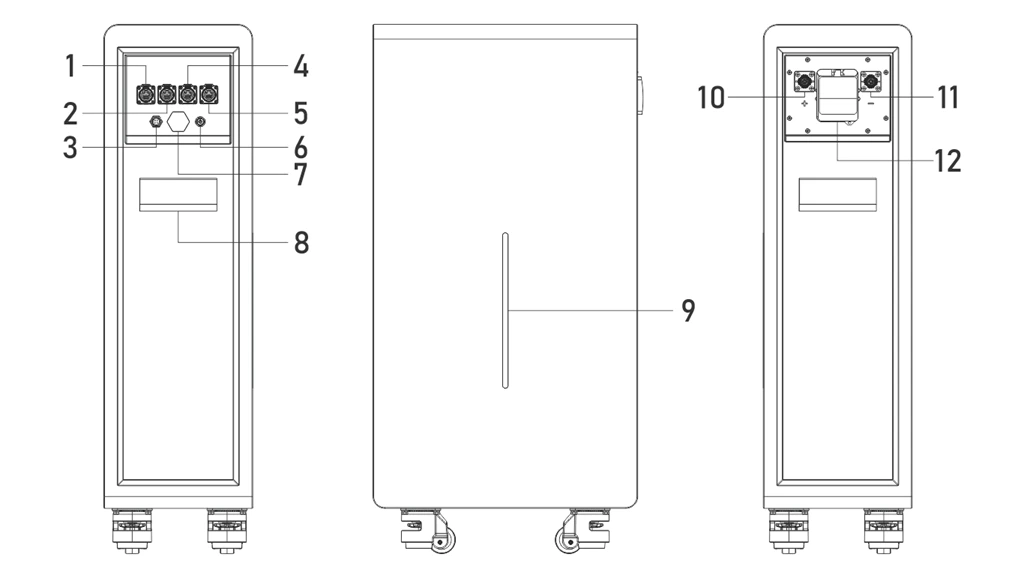
Interface panel — item numbers correspond to the Key Panel Components table on p. 01
03SAFETY POINTS
Read before any operation
DANGER — Electric Shock Hazard
Before any operation, be sure to switch off the battery circuit breaker and press the ON/OFF switch to turn off the BMS. Residual voltage may remain between terminals after power-off; wait at least 10 minutes and confirm with a multimeter that no voltage is present before wiring.
CAUTION
- Never short-circuit the positive and negative terminals, never reverse the polarity; never connect batteries in series
- This product weighs 125kg; never force it with a single-person carry, and never lay it on its side or upside down
- Use insulated tools, wear insulated gloves, and remove metal jewelry
- Never disassemble the battery except by manufacturer-authorized personnel
04INSTALLATION
Floor-standing on casters
1
Environmental requirements
The floor must be level and bear sufficient load; the site must be well ventilated, dry and clean, away from direct sunlight (prolonged summer exposure to high temperature may affect charge/discharge performance). Clearance: ≥100mm from walls on both sides, ≥300mm at the top, ≥800mm of operating space in front.
2
Move into position
Push the battery to the installation spot using the side handles with the bottom casters (two people recommended to prevent tipping). Lock the casters once in place and confirm it is level with a spirit level.
3
Unpacking inspection & voltage check
Check the unit against the parts list. Power on (ON/OFF switch), close the circuit breaker, and measure the voltage across the positive and negative terminals with a multimeter — it should normally read 40V ~ 58V. Do not install if the reading is abnormal; contact technical support.
GOBEL POWER
Quick Installation Guide
Electrical Connections
05ELECTRICAL CONNECTIONS
Inverter OFF before wiring
5.1 Grounding
- Complete the grounding of the battery system in accordance with local electrical codes and the inverter's requirements
5.2 Power Cable Making & Connection
- Prepare your own 50mm² power cables: pass the cable through the tail cover of the energy-storage quick-connect terminal (02), strip it, insert the conductor to the bottom of the crimp barrel, crimp with a matching crimping tool, then screw the tail cover back on to lock
- Crimp the other end of the cable per the terminal specification of the inverter or busbar, and tighten to the torque required by the corresponding manual
- Insert the positive quick-connect terminal into the battery's positive terminal and lock it fully, with the other end going to the inverter's positive battery input — likewise for negative
CAUTION
Confirm the inverter is powered off before connecting, and verify correct positive/negative polarity — reversed polarity will cause severe equipment damage. Poor crimping causes abnormal heating or even burning; check every crimp is secure.
5.3 Communication Connections
- Inverter communication: connect one end of the communication network cable to the RS485A/CAN port of the host battery, and the other end to the inverter's BMS communication port (RS485 or CAN, depending on the inverter)
- Outdoor installation: waterproof the battery-end connector (both ends for parallel cables) with the RJ45 waterproof cable gland (06) and RJ45 plugs (07) — see the "Making Waterproof Communication Cables" chapter of the installation manual
- Parallel communication (multiple batteries): connect the first battery's RS485B to the second battery's RS485C, the second battery's RS485B to the third battery's RS485C, and so on in a daisy chain
- The supplied network cable is symmetrically wired; if it does not match the inverter's pin definitions, make a custom cable (e.g., for Victron inverters) — pin definitions in Appendix III of the installation manual
Note: parallel addresses are assigned automatically by the system (auto addressing) — no manual DIP setting is required.
5.4 Multiple Batteries in Parallel
- Connect the positive and negative terminals of each battery to a busbar via power cables, then connect the busbar to the inverter
- Never parallel batteries of different models or specifications
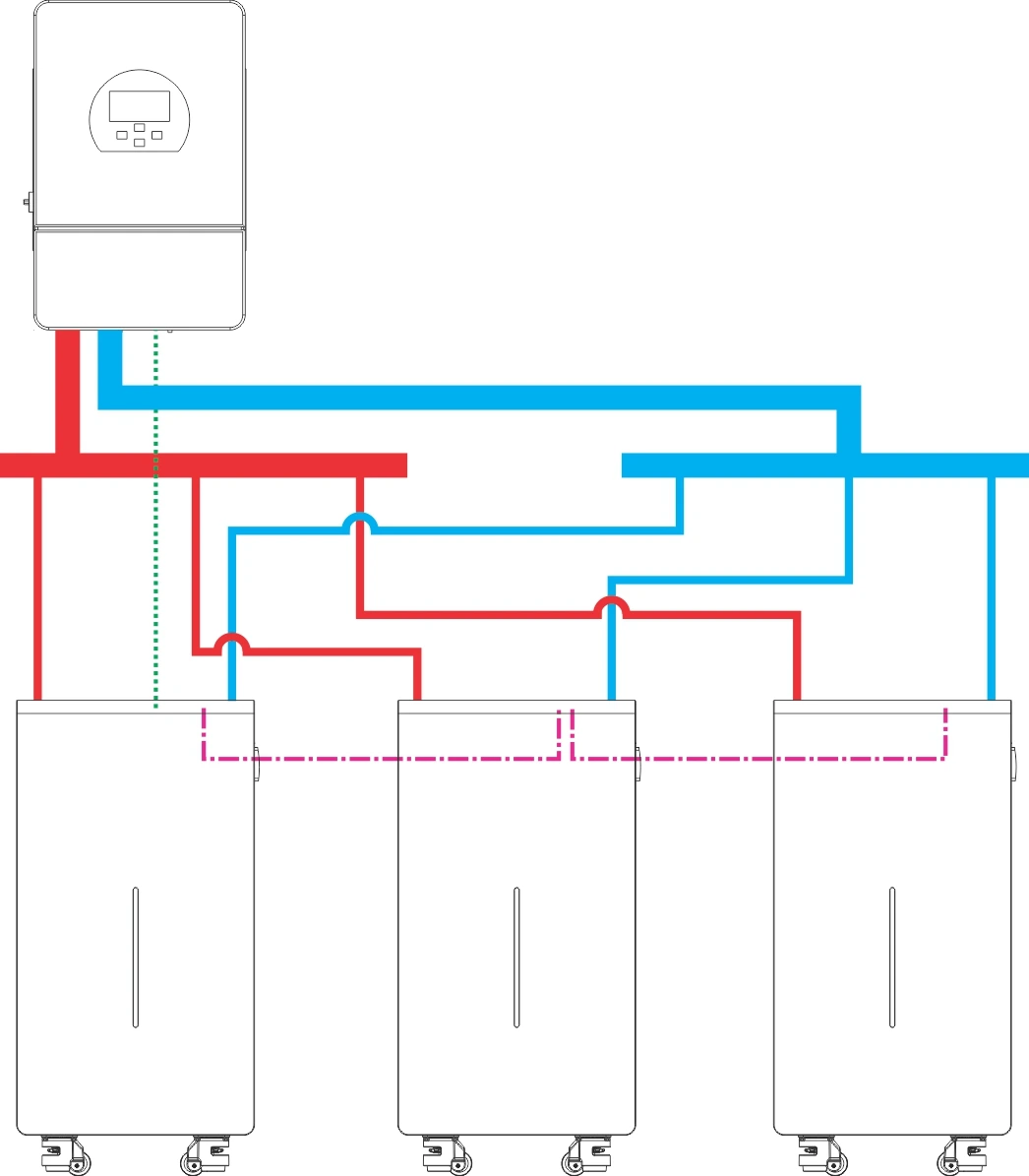
Multiple batteries connected to an inverter
Line Legend
─────Solid lines: power cables and busbars
·····Dotted lines: inverter communication cables
-.-.-Dash-dot lines (-.-.-): parallel communication cables between batteries
GOBEL POWER
Quick Installation Guide
Protocol · On/Off · Troubleshooting
06COMMUNICATION PROTOCOL SETTINGS
Host battery only · choose one of three
APC Host Software
Connect a Windows PC with the RS232-USB communication cable (04) and set the protocol in the host software
BMobile APP
Connect a phone with the USB Type-C data cable (05) and set the protocol in the Gobel Console APP
CGobel VRM Platform / APP
After the battery joins the network, set the protocol online on the Gobel VRM platform or APP
Note: before configuring, confirm that the inverter is compatible with the battery (see the compatibility list in the "Reference Files" section of the installation manual).
07POWER-ONIn order
- Confirm that all cables are securely connected and that no personnel or foreign objects are in the area
- Press the ON/OFF switch on every battery to power on, and wait until the LED light bar shows normal status with no alarms
- Set the circuit breakers of all batteries to ON
- Turn on the inverter power and set the battery type to lithium battery
- Confirm that the inverter can correctly read the battery data (voltage, SOC, temperature, etc.), then proceed with charge/discharge testing
08POWER-OFFIn order
- Turn off the inverter
- Wait until it has fully stopped
- Set the circuit breaker to OFF
- Turn off the BMS (ON/OFF switch)
WARNING
Never turn on the inverter before, or together with, closing the circuit breaker, and do not skip the waiting step — inrush current may damage the equipment.
CAUTION
Residual voltage may remain between terminals after power-off; do not touch the terminals immediately.
09QUICK TROUBLESHOOTING
Details → manual appendices
| Symptom | Solution |
|---|---|
| Inverter cannot read battery data | Check the communication cable connections; verify the pin definitions; reset the communication protocol |
| Alarm (Alarm) indicator is on | Investigate the cause of the fault; contact technical support if it cannot be resolved |
| Abnormal terminal voltage at unboxing (below 40V or above 58V) | Stop installation and use; contact technical support |
| WiFi/APP cannot connect | Reconfigure as described in the WiFi User Manual |
| Abnormal heating at the quick-connect terminal connections | After powering off, re-insert the terminal fully; re-crimp if necessary |
10 · More Documents
Gobel PowerCarol 16 Installation Manual (PCBMS Version) — full version
WiFi User Manual · PCBMS Software User Manual · Gobel Console APP User Manual · Inverter Compatibility List — see the "Reference Files" section of the installation manual
www.gobelpower.com
[email protected]